Aug 31, 2010

HP Puts USB 3.0 Ports in New Laptops

Hewlett-Packard on Wednesday said it has added USB 3.0 ports to its latest laptops that could boost data transfers between computers and devices such as storage drives and digital cameras.

HP will add up to three USB 3.0 ports in EliteBook business laptops to connect to external devices and peripherals. The laptops include EliteBook 8540p and EliteBook 8540w workstation laptops, which are expected to be shown at the International Consumer Electronics Show to be held in Las Vegas between Jan. 7 and 10.

The USB 3.0 standard is a speedier successor to the existing USB 2.0 ports that come with laptops today. When the technology matures, USB 3.0 technology will provide the bandwidth to transfer data close to 10 times quicker than USB 2.0, standards group USB Implementers Forum said on Wednesday.

The addition of USB 3.0 ports will especially help laptops communicate at a much faster rate with high-speed external devices, an HP spokesman said. Around 1GB of data could be moved from a USB 3.0 flash drive to a host device in 3.3 seconds, compared to 33 seconds for USB 2.0, USB-IF representatives said.

Govt-Approved Encrypted USB Drives Hacked

German security research group SySS GmbH has uncovered a serious vulnerability in encrypted USB drives from Kingston, SanDisk and Verbatim. SySS analyzed the PC-based password-checking software associated with these devices and found they could easily force it to unlock the encrypted drives without any need for the user's password.

These drives received the U. S. Government's FIPS 140-2 certification based mainly on the fact that they use tough 256-bit AES encryption, but the encryption itself is not at fault. Rather, the research team discovered that the actual encryption key used is not dependent on the password. The password-verification utility sends the same decryption string on receipt of a valid password, so they simply hacked it to always send that decryption string.

Kingston initiated a recall drive for the affected units. SanDisk and Verbatim now offer an updated version of the PC-based password-handling utility. Comments at security expert Bruce Schneier's blog suggest that updating the software may be insufficient because files already on the drive will still be vulnerable. PCMag suggests that if your encrypted drive is one of those affected, move all files from the drive to your PC, install the update, and then move all files back.

First USB 3.0 Tests: Western Digital’s My Book Sails Through

The Western Digital My Book 3.0 desktop external drive will be one of the first to market with the new SuperSpeed USB 3.0 interface. Announced today, the 1TB version is available for sale today; the 2TB is due later this week. So does USB 3.0 deliver on its promises? We got the 1TB My Book 3.0 into the PC World Lab, and our early results look very promising.

As an interface, USB 3.0 carries a lot of promise: Theoretically, the maximum performance of USB 2.0 was 480 Mbps, while that of USB 3.0 is 4.8 Gbps--a ten-fold theoretical increase. But in reality, the limitations of the drive itself--currently at 3.0Gbps--creates another bottleneck in the USB 3.0 environment. As such, industry experts are saying we can expect to see approximately a three-fold increase in real-world performance.

In the PC World Lab's tests, those estimates were borne out. We compared the My Book 3.0 as tested over USB 3.0 and USB 2.0, and compared it to a Western Digital My Book Home Edition 2TB tested over eSATA.

Jungo Launches Driver-Less USB Software for Mobile Data Cards

SAN JOSE, Calif.--(BUSINESS WIRE)--Jungo Ltd., a leading provider of connectivity systems and driver development tools, today announced the release of its ZeroDriver software, which enhances the user experience by enabling seamless connectivity between USB data cards (both 3G and 4G) and any laptop or PC, without the need to install drivers or applications on the host PC.

ZeroDriver supports all data card features that in the past have required drivers or additional applications, including dial-up and high speed browsing, voice calls, SMS, diagnostics, network statistics and more.

Equipping a data card with ZeroDriver is a highly cost-effective and user-friendly solution, for example, it reduces installation support calls to a minimum, maximizing user satisfaction and in turn, increasing ARPU. With support for HSPA+ bandwidth standards, ZeroDriver is fast and extremely flexible - it is easily ported to a variety of hardware mobile platforms.

ZeroDriver is currently available for Windows XP, Vista and Windows 7 and is compatible with a wide range of PC applications, including Internet Explorer, Firefox, MS Office, Thunderbird and more. Future versions will support Mac and Linux. ZeroDriver is also available in "installation mode" for operators who want to offer enhanced system support.

"Due to its ease of use and global availability, USB has become the standard interface between mobile broadband modems and PCs," said Jeff Ravencraft, president and chairman, USB Implementers Forum. "We are pleased Jungo supports USB technology, by extending the simplicity and broad capabilities of USB to its customers."

Sunbeamtech Launches SuperSpeed USB 3.0 Ready Products

Sunbeamtech is releasing a series of USB3.0 products by the end of this February, 2010. The products to be introduced are: 2-Port SuperSpeed expansion card, HDDPAL and Airbox. The transmission speed of SuperSpeed USB 3.0 is more than 10 times faster than USB 2.0. For actual big files transmission demand, USB3.0 products will be able to save users much time. Follow the link below to find out more about these new products.

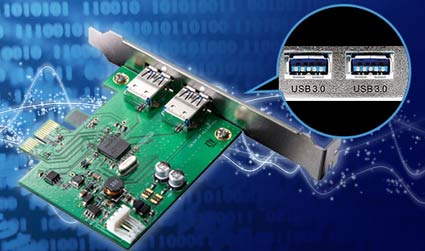
Sunbeamtech SuperSpeed USB 3.0 Add-in Card


Have you ever wished that your USB interface could transfer data faster? With a maximum transfer rate of 5Gbps, the USB3.0 Expansion Card was designed to add USB3.0 interface to your computer without your having to upgrade your motherboard.

Secure USB Drive Leverages Windows Embedded

SPYRUS, a provider of hardware-based encryption, authentication and digital content security products, is releasing a new class of USB encryption device pre-loaded with the Microsoft Windows Embedded Standard 2009 operating system. Known as the Hydra PC Secure Pocket Drive, SPYRUS says the new USB turns a commodity microSD card into a militarized security device.

Secure Pocket Drive builds on a hardware-based pre-boot authentication system for Windows SPYRUS developed more than 10 years ago. Using a solution that includes a secure boot loader to authenticate and check the integrity of the device using on-board hardware security, Secure Pocket Drive will not boot the Windows Embedded Standard 2009 operating system if the device has been tampered with.

After pre-boot authentication, Secure Pocket Drive loads the componentized Windows Embedded Standard 2009 and allows access to the user’s applications and data files. End users can then perform multiple functions, including network/Internet browsing and scheduling in the Windows Embedded Standard 2009 environment. Because everything is running directly from the Secure Pocket Drive, SPYRUS says malware and other cyberthreats are not an issue. As an added bonus, it leaves no footprint on the host PC.

Other security features include FIPS 140-2 Level 3 tamper-resistant epoxy potting with built-in anti-tamper and self-destruct mechanisms to protect against unauthorized access to the device and data. The protected sectors of the device’s memory, the Windows Embedded Standard 2009 operating system, and all data and application files are encrypted with advanced, hardware-based XTS-AES 256-bit encryption.
In November 2009, IBM partnered with VMWare and secure portable device vendor NSEC to place IBM’s Lotus Symphony productivity software suite on NSEC Keepod USB drivers. By providing a completely secure and portable version of Lotus Symphony, IBM launched a flank assault on the dominance of Microsoft Office with business enterprise users.

While the Secure Pocket Drive does not contain Microsoft Office, it does offer a secure and convenient way for business enterprise users to take the Windows OS with them wherever they go.

USB Interferes with Boot

That happens to me all the time.

Here's the problem: All PCs have a configurable boot order list. They try to boot from the first device on the list, and if there's nothing there to boot from, they check device number two. Your PC's boot order lists the USB ports before the hard drive. When you boot the PC, it checks to see if there is a storage device plugged into a USB port. If there is, it tries to boot from that device. If the device lacks an operating system, the PC hangs.

It would be smarter, of course, if the PC went to the next boot device instead, as it would if it found an unbootable disc in the CD/DVD drive. But the PC isn't that smart.

You can get around this problem by changing the boot order. I can't tell you exactly how because it depends on your BIOS. When you turn on your PC, watch for a message (one of the first things to display) that tells you to press a particular key (say, F2) for Setup. Press that key immediately for the setup menu. Search the menu for boot or boot order options, and when you find the right option, change it.

USB 3.0 Tested: How Fast Is It in the Real World?

I've written a lot about USB 3.0, and finally I've been able to test an external USB hard drive in the real world. As I expected, I did see a big improvement in performance, but not nearly the performance numbers I saw in the demos at the Consumer Electronics Show.

That is partly because the speed of the USB connection is only one of many factors that impact real-world hard-drive performance.

The drive I tested was the Seagate Black Armor PS110, a 500GB, 7,200-rpm, 2.5-inch external drive. It comes with an Express Card USB 3.0 controller (based on NEC's internal controller). With a list price of $179.99, and features such as 256-bit AES encryption, this drive is aimed at enthusiasts and a business audience, since it's designed to be faster than the company's more consumer-oriented 5,400-rpm FreeAgent drives.

The Black Armor drive is designed for backing up laptops, with features including backup software and encryption. It can be attached to a USB 2.0 or USB 3.0 port, the latter of which looks the same but is electrically different, though backwards compatible. Because almost no machines come with USB 3.0 ports, the drive ships with an ExpressCard USB 3.0 connector and software that makes it work with a Windows laptop. Because ExpressCard doesn't carry as much power as USB, you also have to plug the card into a USB 2 port.

To test performance, I copied a subset of my photos and directories with 26.7GB of data (16,841 items) to the drive when it was connected to a normal USB 2.0 port and to the USB 3.0 controller. I also read the same data back to another directory on the host computer. For comparison, I tried the same tests with a 500GB FreeAgent drive. And since transfer speed will depend in part on the speed of the host computer, I tried it on two different laptops: a Lenovo Thinkpad T400s with an SSD and a Hewlett Packard Pavilion dv6 with a hard drive.

Here are the results I got. Note that "read speeds" means reading from the external drive and writing to the internal one, and "write speeds" are the reverse.


USB-IF certifies 50 SuperSpeed USB 3.0 products

The floodgates are officially open, folks. Companies around the globe have introduced a range USB 3.0 products, and more are on the way. The USB Implementers Forum (USB-IF) has certified 50 SuperSpeed USB products, including motherboards, notebooks, external storage devices, storage controllers, PCI Express and ExpressCard add-in cards, hard disk drives, and device-enabling silicon.

"The wave of consumer products passing SuperSpeed USB compliance and certification this quarter is extraordinary," said USB-IF chairman Jeff Ravencraft. We've covered a large number of the launches along the way, but of the 50 "certified" items, only 45 are listed on the outfit's site. That means that at least five certified USB 3.0-equipped electronics have yet to debut.


In case you're a bit late to the show, USB 3.0 brings quicker data rates, higher energy efficiency, and increased power delivery. To learn more, read our overview of the ever-ubiquitous interface.

New USB Drive Finds Porn Pics On Computers

(CBS4)  If you've ever wanted to check out a computer to see just how much porn is on the hard drive, then a new USB stick from the company Paraben is for you. The stick can be plugged into a computer's USB port and detect 99 percent of all pornographic images on a hard drive.

The device which costs around $100, searches the hard drive using "advanced image analyzing algorithms that categorize images as potentially harmful by identifying facial features, flesh tone colors, image backgrounds, body part shapes, and more," according to www.china-usb.cn/.

And if you think that just deleting the images will protect from the porn stick, beware. The Paraben stick will find any pornographic images that you've deleted as well.

Paraben said that for a 500 GB hard drive containing 70,000 images a full search will take around 90 minutes. But for porn lovers out there, the device doesn't search for video, which means part of your digital porn collection will remain out of reach of the Paraben stick.

Copy Protection for USB Flash Drives

TrusCont Secure Flash Drive (TSFD) is an enhanced USB flash drivers that contains built in security enhancements such as copy protection.


Unlike standard USB flash drives, the TSFD includes a powerful internal microcontroller, which is programmed to secure the content stored on it.

Key Features

  • Hardware based software protection
  • Large storage capacity (up to 8Gb)
  • Read only USB Flash Drive - optionally prevent end users from deleting your content
  • Configurable memory domains - divide the TSFD memory to read-only / read-write partitions.
  • Easy to use duplication software - TrusCont TSFD Protection Toolkit

Official Xbox 360 USB Drives Overpriced

US retailers GameStop, has listed details of the official Xbox 360 USB Drives which it claims will start shipping from April 6th. This is the same date that the dash update will hit consoles connected to Xbox LIVE for a USB Memory enabling patch that will allow gamers to save games and DLC on ‘ANY’ compatible USB memory device.


The official Xbox 360 branded USB device will come pre-loaded with the update and is guaranteed to work on all Xbox 360 consoles, whilst other USB devices will need to be plugged into the console for a compatibility check. Further more, the update will allow 2 USB devices up to 16GB each plugged into the console as Microsoft have now discontinued production of their own Memory Cards and HDD’s under 250GB.

GameStop Listing:

Carry your game with the SanDisk Xbox 360 USB Flash Drivers. Now you can take your profile anywhere you want to play. Arcade console owners can take full advantage of Xbox LIVE to connect with friends and competitors in the on-line world by downloading games, player content, music and video.

The pre-configured Xbox 360 USB Flash Drive by SanDisk provides not only a seamless experience, but also comes with a 1 month Xbox LIVE Gold membership. Just plug it in, experience all that Xbox LIVE has to offer, and take your game saves and gamertag with you wherever you go.

Anyone wishing to purchase the official Xbox 360 USB device by SanDisk can choose between the 8GB version for $39.99 or the 16GB version for $69.99. The average price for a non Xbox 360 branded SanDisk 16GB USB device is $30.00.

That sure is an expensive 1 month of included Xbox LIVE Gold membership!

Aug 26, 2010

MCCI Grows SuperSpeed USB 3.0 Software Products

About MCCI

MCCI is a leading developer of USB drivers and firmware for the high volume portable device markets. The company provides firmware and system software, including the PictBridge and MTP middleware solutions for OEM/ODM manufacturers of cellphones, PDAs, and other computer devices. MCCI experts are actively involved in worldwide technical standard activities. A privately held corporation, MCCI has its headquarters in Ithaca, USA and support/development offices in Austin, USA; Seoul, Tokyo, and Taipei. For more information please visit: http://www.mcci.com.

Victorinox Offers 'Unhackable' USB Stick

Victorinox, best known as the maker of the Swiss Army knife, has released a USB memory stick that the company claims is "un-hackable."

The Victorinox Secure device, which comes attached to the popular multi-function knife, uses several layers of security, including fingerprint identification and a thermal sensor. Combining a fingerprint with heat makes it impossible to access the device with a finger detached from the body, something one might see in a Hollywood movie.

The memory stick is tamper-proof, the company claims. Any attempt to forcibly open it triggers a self-destruct mechanism that burns the device's CPU and memory chip.

During a two-hour launch event in London Friday, Victorinox challenged a team of professional hackers, and offered almost $150,000 if they could break into the device. The team was unsuccessful.

Microsoft Readies USB Storage Support for Xbox

Joystiq's Alexander Sliwinski reports a credible rumor: Come this spring, Microsoft will allow Xbox 360 owners to install and download games onto external USB storage. He's got photo documentation supposedly written by a senior Microsoft engineer and confirmation from two anonymous sources to prove it.

The documents say you'll be able to store Xbox Live Arcade games, downloadable content, full-scale Games on Demand and title updates on up to two connected storage devices at a time. Installing disc-based games to USB drives is also a possibility, but you'll still need a disc in the tray, just like when you install a game to the hard drive now.

I still think the 120 GB hard drive on current Xbox 360 models is enough, but the earliest Xbox 360 models, which had 20 GB drives, can feel the squeeze. Microsoft gets a lot of heat for the price of its memory cards ($30 for 512 MB) and replacement hard drives ($130 for 120 GB), so this rumor will make Xbox 360 owners happy if it comes to fruition. This would definitely bolster the appeal of the $200 Xbox 360 Arcade, which lacks a hard drive. Joystiq says hard drives will be partitioned for 16 GB of storage maximum, but a 16 GB USB stick for $40 is still a better deal than Microsoft's memory cards.

The question, of course, is why? I doubt we'll ever hear an official explanation, but my best guess is that this has something to do with Datel's antitrust lawsuit against Microsoft. Until last November, Datel sold unofficial memory cards, which stored more data at a better cost-per-megabyte than Microsoft's official products. Microsoft banned unauthorized storage products from the Xbox 360, and Datel claimed the console maker was being anticompetitive.

Maybe it's wacky to assume that Datel's lawsuit has anything to do with this, but the addition of USB storage would certainly take a bite out of Datel's argument.

BitLocker, USB drives not at fault — it's BIOS

Q: I recently installed BitLocker on my laptop in an effort to provide security for the data in the event the computer is lost or stolen. I used the option to create a Startup Key with a USB drive and it works fine. The only problem is that whenever I try to create a copy of the Startup Key using the BitLocker Manager everything seems to work, but when I try to use the copy the computer refuses to boot. I've tried several different USB drivers to no avail. The only way to get things going again is to use the original Startup Key.

— Brad Austin

A: For those who don't know, BitLocker is a drive encryption application that is provided with the Ultimate version of Microsoft Windows 7.

As it happens, the problem isn't with either BitLocker or with your USB drives. It's with your laptop's BIOS. Specifically, in some cases the BIOS software — the software that controls your computer until the operating system loads — doesn't recognize USB drives over a specified capacity. Once the computer's operating system kicks in, you won't have any problem using that larger capacity USB drive. But if you're trying to boot from it, the BIOS simply won't see it.

The quick solution? Try a USB drive with a capacity of 512 megabytes or less.

A couple of other things to keep in mind: First, if you're using USB Startup Keys, make sure you don't carry it around in your computer case. That would defeat the whole security purpose.

Second, you can avoid the need for keeping track of USB Startup Keys by making sure that the next laptop you buy supports the Trusted Platform Module, a chip included in enterprise-level computers that supports device encryption and user authentication.

So far, hardware manufacturers haven't seen fit to spend the extra couple of bucks to include the technology in consumer-level computers.

USB 3.0: First Hard Drives Arrive

When you're in front of your PC, waiting for something to transfer to removable media, seconds can feel like minutes, and minutes like hours. And backups to USB 2.0 appear to crawl along at a snail's pace--so much so that users often become reluctant to perform that essential chore.

Such data-transfer scenarios are where the new Super­­Speed USB 3.0 standard and its theoretical, blazing-fast through­­put of 5 gigabits per second--as promised by the USB Implementers Forum (USB-IF)--will change your life for the better. And if our tests of four new USB 3.0 hard drives from Buffalo Technology, Iomega, Seagate, and Western Digital are indicative, the change will be dramatic.

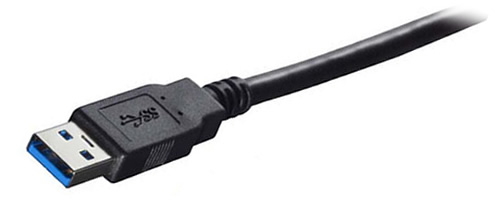
USB 3.0's impressive speed is its raison d'être, but part of its beauty is its backward compatibility with USB 2.0. You need a new cable and a new host adapter (or one of the new motherboards built to support USB 3.0) to achieve USB 3.0 performance. But you can still use a USB 3.0 device on a USB 2.0 port and achieve typical USB 2.0 performance. You may also use USB 2.0 devices on a USB 3.0 port--though, again, with no gain in speed.

Trancend introduced JetFlash 330 USB Flash Drive

Trancend JetFlash 330 Trancend introduced JetFlash 330 USB Flash Drive.A worldwide leader in storage and multimedia products, Transcend Information, Inc. introduced New JetFlash 330 USB Flash Drive in market. JetFlash 330 features with efficient data transfer and comes with up to 16 GB storage capacities and bright LED indicator that flashes during data transfer activity.

The JetFlash 330 has transfer speed of up to 15MB/s and it is fully compatible with Windows ReadyBoost, a feature of Windows 7 that allows users to optimize system performance by increasing available memory. JetFlash 330 USB flash drive is also able to double as additional computer RAM.

The JetFlash 330 is now available in 4GB Green (Model number: TS4GJF330), 8GB Purple (Model number: TS8GJF330) and 16GB Lavender (Model number: TS16GJF330) capacities and comes with limited lifetime warranty. Also user can download and install Transcend’s free JetFlash Elite data management tools for JetFlash 330.

Features of Trancend JetFlash 330:

  • Available in three capacities: 4GB Green, 8GB Purple and 16GB Lavender
  • Fully compatible with Hi-speed USB 2.0 interface
  • Easy Plug and Play installation
  • USB powered. No external power or battery needed
  • LED status indicator
  • Offers a free download of JetFlash Elite data management tools
  • Lifetime warranty

Trancend introduced JetFlash 330 USB Flash Drive

Trancend JetFlash 330 Trancend introduced JetFlash 330 USB Flash Drive.A worldwide leader in storage and multimedia products, Transcend Information, Inc. introduced New JetFlash 330 USB Flash Drive in market. JetFlash 330 features with efficient data transfer and comes with up to 16 GB storage capacities and bright LED indicator that flashes during data transfer activity.

The JetFlash 330 has transfer speed of up to 15MB/s and it is fully compatible with Windows ReadyBoost, a feature of Windows 7 that allows users to optimize system performance by increasing available memory. JetFlash 330 USB flash drive is also able to double as additional computer RAM.

The JetFlash 330 is now available in 4GB Green (Model number: TS4GJF330), 8GB Purple (Model number: TS8GJF330) and 16GB Lavender (Model number: TS16GJF330) capacities and comes with limited lifetime warranty. Also user can download and install Transcend’s free JetFlash Elite data management tools for JetFlash 330.

Features of Trancend JetFlash 330:

  • Available in three capacities: 4GB Green, 8GB Purple and 16GB Lavender
  • Fully compatible with Hi-speed USB 2.0 interface
  • Easy Plug and Play installation
  • USB powered. No external power or battery needed
  • LED status indicator
  • Offers a free download of JetFlash Elite data management tools
  • Lifetime warranty

Kingston's 256GB DataTraveler 310 USB flash drive tested

If you think £600 is too much to spend on a USB flash drivers the size of your thumb, clearly you haven't seen this one. Kingston has managed to squeeze 256GB -- a quarter of a terabyte! -- of flash memory into its latest DataTraveler 310 drive, and we've been playing with one.

This drive holds about 128 times more data than the one you may have on your keyring. It'll store 54 DVDs, or even the entire contents of 10 Blu-ray discs. And not only that, it's ludicrously fast.

In our anecdotal testing it transfered a 600MB file from our MacBook Pro's hard drive in a matter of seconds. Kingston claims a maximum write speed of 12MB/s (megabytes per second), but we saw it manage to sustain around 18MB/s when transfering a 1.3GB file.

Read speed is even faster. We pulled the same 1.3GB file back from the DT310 in under 60 seconds, with a transfer rate hovering around the 24-26MB/s mark.

It's this combination of speed and capacity that warrants the hellish expense: It's aimed at people who need to rapidly transport enormous data files, without the inconvenience of external hard drives or the bottlenecks of corporate networks.

LaCie debuts USB 3.0 mobile hard drive

LaCie has announced the latest addition to its Rugged family of mobile hard drives: the LaCie Rugged USB 3.0; combining the fast speeds of USB 3.0 and the company's rugged design. LaCie says that the Rugged USB 3.0 is one the most power-efficient and fast-performing mobile hard drives offered by the company.

The Rugged USB 3.0 provides speeds of up to 110 MB/s -- three times the speed of USB 2.0 -- according to the company. It offers improved power efficiency, so you only need one cable.

If you do not have a USB 3.0 connection on your PC or notebook, LaCie also offers PCI Express or ExpressCard bundled options with the Rugged USB 3.0.

The LaCie Rugged USB 3.0 is backward compatible with USB 2.0. This means it will work with any computer or notebook that has a USB connection - offering instant usability no matter what version of USB.

Housed in the Rugged casing designed by Neil Poulton, the LaCie Rugged USB 3.0 features a scratch-resistant aluminium shell, internal anti-shock absorbers, and a shock-resistant rubber bumper to better protect files against everyday blunders.The LaCie Rugged USB 3.0 will be available in 500GB capacity for £118 plus VAT.

IronKey Introduces New USB Drive For Secure Online Banking

IronKey has developed a new USB drive specifically designed to protect the online banking consumers from hacking attempts. The 256-byte USB drive acts as a secure environment for people to do their banking safely from any computer.

Increased Online Banking Security

With the growing popularity of online banking, security has become a big concern. Many people access their accounts from public computers, or are not sufficiently informed or protected against malware programs that are targeted at online bankers.

IronKey

The National Automated Clearing House (NACH) suggests that you only use one dedicated computer for financial transactions. Online banking related fraud were up to $1.5 million a week last fall, according to the FBI’s Internet Crime Complaint Center.

An Alternate Security System

For those who can’t afford to have a dedicated computer for finance, IronKey’s Trusted Access for Banking is basically a virtual space which runs its own software, allowing users to access secure websites without exposing themselves to viruses that could be lurking on the computer they are using.

The software can be programmed to only visit certain sites, and utilizes secure DNS services, so you know the sites you are going to are what they say they are and that no malware finds its way back to your computer. In addition, the drive in non-writable, so the device itself cant be infected with malware.

The device will soon become available from IronKey for banks, who will in turn distribute the drives to their customers.

Microsoft Update Enables USB Storage for Xbox 360

Xbox 360 users can now load games or videos through USB flash drivers.

Microsoft Tuesday released a software update that allows users to configure a flash drive with up to 16GB of storage. The USB port is also used to connect wired controllers and other gaming accessories.

Only two USB storage devices can be connected to the console at once to get up to 32GB of expanded storage, which will supplement the storage provided by the internal hard drive. Data that can be loaded or stored from the thumb drives include Xbox 360 games, game data and movies. Users will not be able to load original Xbox games or MP3 or WMA music files.

To configure a USB flash drive, the console must have the latest update, which can be acquired through Xbox Live, Microsoft said. Instructions to update the console are provided on Microsoft's support site.

SanDisk is already taking orders for a pre-configured Xbox 360 branded flash drive, which will include the update, according to the company's Web site. The 16GB is priced at US$69.99, while the 8GB is $34.99. The drives will start shipping on May 5.

Aug 25, 2010

First USB 3.0 Portable Drives Hit Market

A majority of laptops come with USB 2.0 ports, but that will change as its successor, USB 3.0, begins to take hold. HP has said it will bring USB 3.0 to a majority of its high-performance and business laptops later this year.

USB ports connect host devices, such as PCs, to other devices such as printers and storage drives. USB 3.0 increases bandwidth and transfers data close to 10 times faster than USB 2.0, according to the USB Implementers Forum (USB-IF), an organization defining USB standards.

The USB 3.0 interface can offer a transfer rate of 5G bps (bits per second) compared to 480M bps per second for USB 2.0. For example, 1G byte of data can be transferred to a host device in 3.3 seconds with USB 3.0, compared to 33 seconds with USB 2.0.

Transfer rates of drives will increase as technology surrounding USB 3.0 develops. Over the last few months, storage devices like external hard drives and SSDs (solid-state drives) with varying data transfer rates have appeared on shelves from companies like OCZ, SuperTalent and LaCie.

SanDisk ships pricey Xbox 360 thumbdrive

Would you pay $34.99 and $69.99 for an 8GB or 16GB USB thumbdrive, respectively? Well, that's the asking price for SanDisk's Xbox 360 USB Flash Drive for gamers to save their games and profiles on-the-go.

These sticks are preconfigured to work out of the box with Microsoft consoles and include a free one-month Xbox Live Gold membership subscription worth $7.99. To give you an idea of how much you're paying SanDisk to format the flash drive on your behalf, its regular Cruzer Micro-series is available on Amazon for $19.29 (8GB) and $32.99 (16GB). Actually, it's really quite easy to prepare any USB thumbdrive for the Xbox 360 by utilizing the built-in utility available from the menu.

Aug 24, 2010

USB 3.0 Falls Short in New Laptop Tests

USB 3.0 is undoubtedly the future, but tests conducted by Techworld suggest that laptop users in particular might need to upgrade their hardware to see much benefit over current technologies such as eSATA.

The test comprised plugging Freecom's USB 3.0 external drive, the XS Hard Drive 3.0, into a mainstream dual-core laptop using the company's new USB 3.0 Express Card laptop add-on. (See also "USB 3.0 Hard Drives Speed Ahead.")

Throughput was derived using a simple calculation based on how long the drive took to copy and paste a large number of video and image files to and from the laptop, replicating how the drive will actually be used in the real world for functions such as directory backup.

The Freecom XS operating in USB 2.0 mode managed an average throughput of 18.7MB/s for reads and only 11.1MB/s for writes, well below the theoretical maximum of USB 2.0 but in line with real-world transfer speeds on a mid-range laptop.

The same drive in USB 3.0 mode raised this to 36.6MB/s for reads and about the same or slightly slower for writes, although this fluctuated considerably for reasons that might relate to the supplied NEC driver. What matters here is the relative difference rather than the abolute figrues, which will depend on a range of factors including overall system performance.

USB top method to spread malware

The technique of spreading malware has reverted to an old school method, using USB ports as a point of entry.

This was the finding of McAfee’s latest quarterly threat report, which showed USB worms as the top offender for the start of 2010.

“Go back 20 years and malware used USBs to spread,” said Greg Day, director of security strategy in EMEA for McAfee, in an interview with IT PRO. “But we have been living in an age of internet and networking malware.”

“The report has [shown that] this old technique, that was long forgotten, has come back.”

Day said the increase of remote working, with more people using their own devices in and out of the office – be it USB sticks, laptops, tablets or smartphones – is making security even more challenging.

Iron Man USB Drive Unleashed

EAST NORRITON, PA. — Tyme Machines, a supplier of licensed USB drives, has released a new sculpted 3D Iron Man character USB thumb drive.

The drive is a sculpted replica of comic book character Tony Stark’salter ego, Iron Man. The drives range from 4GB to 32GB, starting at $34.99, and are available for sale at www.usb-flash-drivers.com and in select retailers.

“We at Tyme Machines pride ourselves on bringing beloved characters, such as Iron Man, to life in full 3D and making them available to fans across the world,” said John McDaniel, chief marketing officers. “We expect the ‘Iron Man 2’ movie release to generate many more fans of this great superhero and feel we have created a product that any fan can be proud to tote around and show off .”

“Iron Man 2,” starring Robert Downey Jr. as Stark, opened in theaters this past weekend and grossed $133.6 million dollars, the fifth largest opening weekend haul ever.

Seagate offers USB 3.0 upgrade with cable

Seagate's latest external hard drive has come up with a curious solution to the issue of USB 3.0 upgrades - put the interface on the cable rather than the drive.

This means that the new 2.5 inch GoFlex Ultra Portable drives are neither USB 2.0 or USB 3.0, and come with a port into which an interface is plugged. This can be FireWire, eSATA, USB 2.0 and, importantly USB 3.0, which allows the user to choose a lower spec before upgrading to USB 3.0's better performance if that is desired at a later point.

Actually using the drive with the USB 3.0 will also require that the PC or laptop has a USB 3.0 interface. Seagate has also announced desktop and laptop adaptors to achieve this.

The basic square drive itself comes in 320GB, 500GB, 750GB and now 1TB capacities, costing $89.99 (approx £60), $119.99, $159.99, and $199.99 respectively, which includes a USB 2.0 interface kit. Getting the USB 3.0 interface, attached cable and laptop adaptor adds another $79.99 (approx £53). The desktop PCI adaptor costs $39.

IBM Offers USB Drives Infected with Malware

IBM has apologized for handing out malware-ridden USB drives at the recent IBM AusCERT security conference.

"The unlovely gift was supplied to an unknown number of delegates to the Gold Coast, Queensland conference who visited IBM's booth," writes The Register's John Leyden.

"Big Blue does not identify the strain of malware involved in the attack beyond saying it's a type of virus widely detected for at least two years which takes advantage of Windows autorun to spread, as a copy of IBM's email apology published by the Beast Or Buddha blog explains," Leyden writes.

Fastest USB Flash Drives for Xbox 360

Recently Microsoft finally allowed users to use USB flash memory to supplement the over priced hard drives the Xbox 360 relies upon. Usable space is restricted to 16GB, no matter how large the flash drive, but as you can use the drives for both save games and for hard drive installs of games you should see a general performance increase over just the hard drives.
 

All well and good but the question is, which USB drive should you buy? Does ultimate speed matter, or can you use a relatively cheap flash drive and still enjoy a performance and storage boost? We've collected a few together for a quick test on the console, though we'll also be testing them in normal conditions to get a definitive view on which is the fastest.

FlipSync Crams USB Dock Cable into Key-Fob

$20 might at first seem expensive for a USB charging cable, especially as it is limited to Apple’s iDevices. But when you are down to the last few excited electrons in your iPhone’s battery and you just have to Tweet that your iPhone is sooo nearly dead, the $20 will look cheap.

So go spend it on Scosche’s flipSYNC already, a keychain USB/Dock cable that folds up into a tiny plastic capsule which itself looks just like the non-key part of your car key. Crack open the case and you have yourself two plugs, ready to gulp down a little extra juice from any nearby computer or other USB-teat.

For those of us not bound up in Apple’s world, there is another version which includes a standard USB connector along with both mini and micro USB plugs. This one is crazy useful, letting you connect phones, hard-drives and even cameras and card-readers to a computer for charging or data-transferring duties, and costs the same $20.

If you can stomach buying replacements for things you already have, then these two adapters, snuggled together on your keyring, could be the most useful $40 you spend since that handy, tasteful Laptop Burka.
 

USB Worm No. 1 Malware: McAfee Report

USB worms have taken the No. 1 spot for top malware in the world, according to a McAfee threat report, released Tuesday.

In addition, the "McAfee Threats Report, First Quarter 2010" indicated a trend of diploma spam coming from China and other Asian countries, while spammers are continuing to exploit high-profile news events, such as the Haiti earthquake, by poisoning search engines. Finally, the report found that U.S.-based servers continue to host the majority of malicious URLs.

Threats on portable storage devices rose to the top of the list as the most popular malware, evident by a rash of AutoRun infections that held the No. 1 and No. 3 spots for top five malware over the last quarter.

Security experts contend that attacks delivered via portable storage devices have experienced a revival in recent months, after being dormant for an extensive period of time.

"It's kind of like your old-school style of malware, one device to another device" said Dave Marcus, security research and communications manager for McAfee Labs. "Those were dead for the longest period of time."

Password-stealing Trojans rounded out the top five malware following portable storage-based attacks, which included generic downloaders, unwanted programs and gaming software that anonymously collects statistics, according to the report. All of the top five threats remained consistently popular worldwide.

Aug 23, 2010

Iomega Shows off Large USB 3.0 Drives

Iomega has become the latest vendor to add SuperSpeed USB 3.0 to its external hard drives, announcing a swathe of portable and desktop products.

Most interest will center on the new eGo Portable Hard Drive, which comes as a 500GB capacity unit that will have to be used with a separate USB 3.0 Express Card adaptor card to get improved performance.

Desktop PC users, meanwhile, are being offered the eGo desktop Hard Drive, which offers the same USB 3.0 interface but with larger capacities of 1TB and 2TB.

Iomega is claiming up to 10 times the performance of the equivalent USB 2.0 eGo drives, which have also been refreshed with higher capacities, including the 1TB eGo Portable Hard Drive Compact Edition.

Impressive as this sounds, informal tests carried out by Techworld some weeks ago suggest that as far as laptops are concerned the transfer boost will probably be much more modest. Desktop USB 3.0 drives can be used with internal USB 3.0 PCI Express adaptors at a reasonable tilt, but laptops have to make do with the more limited Express Card 1.0 interface. Until a newer version of this spec arrives - it is due out this year - this interface will restrict USB 3.0.

Mac users might be tempted by the new eGo Blackbelt Mac Edition drive, which sticks with Firewire 400/800. This is basically a portable drive with rubber protection belt that claims to protect against drops of up to seven feet. Bar the formatting using HFS, some colour co-ordination and the odd bit of backup software, Iomega's Mac drives are identical to PC equivalents.

Iomega does appear to add software benefits to its drives not always available with skimping rivals. Thsese include a 1-year subscription to Trend's Internet Security Suite as well as a serviceable backup utility, QuikProtect. Parent company EMC's Retrospect is also part of the deal but only in its Express version.

The 500GB, USB 3.0 eGo drive costs £89.50 (inc VAT), while the 2TB desktop version costs £157.90. As ever, the Mac user pays more. The equivalent 2Tb desktop drive for Apple will cost £214.99. The Express Card interface for laptops costs £34.99, with an identical price for the internal PCI Express version for desktops.

Texas Instruments USB 3.0 host controller almost here

TEXAS INSTRUMENTS HASN'T been in a hurry to bring its USB 3.0 products to market, but it now appears that the company is getting ready to start rolling out its first few products. Today TI announced the availability of a USB 3.0 physical layer transceiver called the TUSB1310 which is targeting a wide range of devices such as smartphones, portable media players, navigation devices and digital still and video cameras etc.

The new PHY is only the first of many new USB 3.0 products to come from TI, although it’s an important one. So far USB 3.0 hasn’t found its way into much outside of mass storage products, but the new PHY will enable USB 3.0 support in a huge range of consumer orientated devices that so far haven’t been considered for the faster interface.

You might not think that USB 3.0 is needed for many of the devices that the PHY can be fitted to. However, wouldn’t you rather that it took mere seconds to copy that high definition video from your camcorder to the hard drive of your computer, instead of minutes? The PHY still requires that whatever device it goes into has everything but the PHY part of what makes USB 3.0 tick integrated into them, but it still makes life easier for companies developing custom USB 3.0 implementations into their hardware.

As we reported in April, TI was working on a USB 3.0 host controller to add to its line-up. Well, it turns out that the company is actually readying a couple of solutions, namely the TUSB7320 which is a two port USB 3.0 xHCI host controller, as well as the TUSB7340 which is a four port xHCI controller. There’s no word on when these two new host controllers will become available as TI’s website simply states that the products are coming soon, although we presume that the "preview" under the model names mean that samples are shipping to partners for evaluation. TI will also have its own four port USB hub controller and a USB 3.0 to SATA 6Gbps bridge solution. Again, both of these products have yet to launch.

NEC/Renesas might’ve been in control of the USB 3.0 PC host controller market so far, but it seems like things are about to change dramatically later this year. By then, we will see not only TI, but also VLI, Fresco Logic and Etron gear up production. That means that we’ll have no less than five manufacturers of USB 3.0 host controllers on the market of which at least two, if not three will offer four port host controllers. Hopefully this will prove to be the break that USB 3.0 needs to become a mainstream technology at an affordable price that we’ll see implemented on all motherboards and in all new notebooks.S|A

Infinitec Infinite USB Memory Drive release pushed back until August


Way back in March, Infinitec announced its Infinite USB Memory Drive with an intended July 1 ship date. Time to update your calendars because it won’t be here on Thursday.

The expected launch date has been pushed back by about two months to August 31. But instead of calling it a delay, the company uses the terms “final shipping date.” Clever. Pricing stays the same at $129, with the pre-sale starting on August 1.

If you’re forgotten in the last four months what this thing actually is, Infinitec has dubbed it the “world’s first” USB memory stick with infinite space. Users can stream and share multimedia via Wi-Fi between Windows XP/Vista/7-based devices. For a very up-close-and-personal look at the Infinite USB drive, check out the demo video on Infinitec’s site.

Kick off your day with ZDNet's daily e-mail newsletter. It's the freshest tech news and opinion, served hot. Get it.

Addonics Adapter Connects ESATA Devices to USB Port

Serial ATA (SATA) might be one of the fastest interfaces for transferring data, but many computers--and all Macs--lack an external SATA (or eSATA) port. For those who need to connect an eSATA device to their Mac, Addonics Technologies has released an eSATA adapter that lets you connect any eSATA storage device to any USB 3.0, 2.0 or 1.1 port.

The $34 adapter is about the size of a cigarette lighter and is compatible with external hard drives, solid-state drives, or optical drives with an eSATA interface. It also works with SATA Port Multiplier Storage, which means it can turn any eSATA RAID storage into a USB 3.0 external RAID system.

The adapter uses an eSATA USB Hybrid port, and supports a maximum transfer rate of 5 Gbps for USB 3.0, 480 Mbps for USB 2.0, and 12 Mbps for USB 1.1, which are the maximum speeds of the respective ports. Since it's powered by USB, no additional power supply is needed--in fact, the adapter itself can even provide juice for low-power 5V eSATA devices, such as 2.5-inch eSATA hard drives.

The adapter is compatible with every major OS, including Mac OS X, and no software driver is needed.

Aug 20, 2010

When USB 3 Will Be Mainstream

Q. I haven't seen much information from journalists or the major PC manufacturers about the new USB 3 option. I know just a few manufacturers have it as an option with their PC. When will it be mainstream?

A. USB 3.0 is a new, much faster version of USB that promises to transfer data up to 10 times as rapidly as the current USB ports (called USB 2.0) and to provide more electrical power to run connected devices. It's also backwards-compatible with USB 2.0, so you don't have to throw out your current USB peripherals. The new system should be especially helpful in cases where you are transferring large amounts of data, such as backing up computers to USB-connected hard disks.

Many computer and peripheral makers are planning to build USB 3.0 into their products, and a few have already done so, sometimes including only one USB 3.0 port while retaining a couple of the older-type ports. I expect to see even more computers and peripherals with USB 3.0 by the holiday shopping season. But it may not be "mainstream"—common on most new devices—until sometime next year.

Q. I'm unsure how syncing works. Is there a danger, when two devices are synced, that an older version of a file might overwrite a later version?

A. It depends on the sync software you're using. Some syncing or backup programs do overwrite an older copy of a file with a newer one. Others, like the Hitachi system I reviewed last week, keep multiple copies, or versions, of a file that changes, so you can retrieve an older version, even after it's been altered. If you're concerned about this issue, make sure the sync or backup service or software you choose supports retaining enough multiple versions of a file to meet your needs.

Aug 19, 2010

USB Drive Malware Exploit Windows 7 Flaw in Apparent Espionage Effort

Microsoft has done a relatively good job building a secure operating system in the form of Windows 7 and patching the few flaws that have been discovered and widely published.  But like any OS there are still some gaping holes, and with Windows 7's growing market share, there's plenty of parties both malicious and altruistic to poke around and find those holes.

The latest threat is a new strain of malware that takes advantage of Windows 7's allowance of "autorun" or "autoplay" files.  

The attack vector begins with an infected machine writing malware to an attached USB drive.  The malware program writes two driver files -- "mrxnet.sys" and "mrxcls.sys" – to the attached drive.  These rootkit files are using a likely stolen digital signature of Realtek Semiconductor Corp.  The drivers serve "rootkit" functionality, disguising malware that is subsequently written to the drive.

Avast! USB Octopus Attacks Your Ports With Seven Hubs!

This device would be terrifying if it weren’t such a remarkably cool idea.  Thank heavens they didn’t decide to make a USB kraken – because we’dall be in trouble (and, besides, I can never remember how many arms and legs a kraken actually has).If you’relike me than you often find yourself trying to figure out which peripheral device to unplug and which one to plug in.  Most laptops these days only provide two or three USB ports, which means you’ll probably need some sort of hub to attach all your goodies to your computer.


Thus: the more ports you can squeeze onto one hub the better. As the name implies this little gadget has eight “arms” that allow you to connect seven different USB devices to one hub.  I know what you’re thinking: eight arms but seven devices?  Yep.  One of the arms connects to your computer.   I guess you could probably also call this device a USB spider – but that’s a little bit creepier than the USB Octopus.  Same idea and same number of “legs.”

Aug 18, 2010

Can I boot my computer from a USB flash drive?

Yes! A bootable flash drive can be the ultimate tool for recovering a downed computer, or perhaps your easiest means of upgrading a netbook's operating system without a CD-ROM drive. Because there's so many potential uses and ways to make a flash drive bootable, unfortunately we won't be able to go in depth for the purposes of this FAQ. To get you started in the right direction, however, here's a handful of scenarios and their associated walkthroughs that we feel are well-written and easy to follow.


Can I boot my computer from a USB flash drive?

Yes! A bootable flash drive can be the ultimate tool for recovering a downed computer, or perhaps your easiest means of upgrading a netbook's operating system without a CD-ROM drive. Because there's so many potential uses and ways to make a flash drive bootable, unfortunately we won't be able to go in depth for the purposes of this FAQ. To get you started in the right direction, however, here's a handful of scenarios and their associated walkthroughs that we feel are well-written and easy to follow.


Why can't I use my flash drive at work?

Corporate environments may employ special software or policies to prevent the use of USB Mass Storage devices on their machines. This could be to prevent the accidental introduction of viruses as examined above, or to prevent users from stealing company data. In either case, if you like your job, we suggest you don't try to get around the policies without written approval.

What are the latest hot trends surrounding flash drives?

The biggest trend that everyone's looking forward to is USB 3.0, of course! Super Talent has already released three SuperSpeed USB flash drives that take advantage of the new interface with reported speeds that are five to eight times faster than the fastest USB 2.0 flash drives. Expect more USB 3.0 drives from other manufacturers to follow shortly.

Another big development with flash drives is how hardware encryption is becoming more of a commodity than a luxury or enterprise feature, being built into flash drives from a range of manufactuers for as little as $20 USD. Drives certified against the FIPS 140-2 standard are almost as cheap, now available at the $60 USD price point from online retailers.

Why should I be concerned with how fast my flash drive is?

In a nutshell, faster flash drives mean less time waiting to transfer files. Less time spent waiting means more time to be productive and less unwarranted coffee breaks. For those who run applications or entire operating systems directly off a flash drive, it also means that your programs will act much more responsive for even the most basic of tasks.

How fast are flash drives?

This mostly depends on when the drive was released and what memory was being used from which manufacturer, but currently the fastest USB 2.0 flash drives on the market are able to reach read and write speeds of up to 34 and 28 Megabytes per second respectively. Typically the manufacturer-listed flash drive speeds only apply to transfers of large contiguous files, whereas smaller files less than 1MB in size can dramatically slow down transfer rates due to the overhead for each file. Actual speeds are also largely dependent on the USB controller of your motherboard and how many USB devices are simultaneously plugged in.

Older high performance drives up to 16GB in size often use what's known as Single-Level Cell (SLC) memory instead of the more-common Multi-Level Cell (MLC) memory, thereby boosting write speeds for smaller files while simultaneously boosting a flash drive's endurance level. SLC memory is more expensive to implement however and offers less storage capacity for the die area, and over time has lost significant interest from semiconductor fabs like Samsung as consumer demand for larger flash drives increases. To make up for the loss of SLC memory, flash drive manufacturers have implemented a number of tricks including the use of quad-channel dual controllers and to a lesser extent custom drivers.

Why not use a portable hard drive instead of a flash drive?

Whereas most 2.5" portable hard drives employ magnetic hard disks with moving parts that can easily break, flash drives are much more durable thanks to their solid state nature, having been known to survive drops of 6' or more on a routine basis and can even survive a load or three in the laundry. A flash drive is also much easier to pocket than a portable hard drive and can attached to a lanyard or keychain, plus they can be significantly less expensive if only a basic model is needed.

Quite simply put, shoppers primarily concerned with storage capacity should stick to portable hard drives for the cheaper cost per GB, while anyone looking to simply move a few office documents, MP3s or handful of movies around from place to place is going to be better served by the portability and durability that is a USB flash drive.

What is a flash drive?

A flash drive is a small external storage device that reads and writes to flash memory, a solid-state storage medium that's both inexpensive and durable. Given that your typical flash drive is the size of an adult's thumb, it's not uncommon to hear of these ubiquitous devices as "thumb drives". Due to their portable nature and near-universal compatibility, flash drives have largely supplanted the floppy diskette as everyone's favorite method for transferring files between multiple computers without the use of a network.

Most if not all flash drives sold today are equipped with a male "A"-type USB plug for connecting to just about every computer sold since 1998, hence the industry term USB flash drive (UFD). That being said, at least two companies were crazy enough to have offered alternatives with FireWire and eSATA/USB combo interfaces, though have largely been phased out leaving USB the undisputed victor.

It should be noted that while newer Solid State Drives (SSDs) share the flash memory medium with traditional USB flash drives and sometimes come equipped with a USB interface, many prefer to keep the two terms distinct from one another due to the large differences in physical size, speed, and price.

What is a flash drive?

A flash drive is a small external storage device that reads and writes to flash memory, a solid-state storage medium that's both inexpensive and durable. Given that your typical flash drive is the size of an adult's thumb, it's not uncommon to hear of these ubiquitous devices as "thumb drives". Due to their portable nature and near-universal compatibility, flash drives have largely supplanted the floppy diskette as everyone's favorite method for transferring files between multiple computers without the use of a network.

Most if not all flash drives sold today are equipped with a male "A"-type USB plug for connecting to just about every computer sold since 1998, hence the industry term USB flash drive (UFD). That being said, at least two companies were crazy enough to have offered alternatives with FireWire and eSATA/USB combo interfaces, though have largely been phased out leaving USB the undisputed victor.

It should be noted that while newer Solid State Drives (SSDs) share the flash memory medium with traditional USB flash drives and sometimes come equipped with a USB interface, many prefer to keep the two terms distinct from one another due to the large differences in physical size, speed, and price.

SanDisk launches Cruzer Blade USB thumblet drive

SanDisk has launched what it calls a paperclip-size USB thumb drive, designed to fit on a key ring and store from 2GB to 16GB of data.

The Cruzer Blade is not the smallest-ever thumblet drive but is about half the size of an ordinary USB thumb drive.

Traxdata claims to have the world's smallest thumb drive, the MICRO USB. The Pico USB flash drive is the size of a finger nail, fits in a thimble and has a ring for keyring attachment.

With these thumblet drives the USB plug is bigger than the actual flash chip and mount. Really, the damn things can't go any smaller - you have to be able to hold one whilst sticking it into a USB slot.

The Cruzer Blade is available now in the United States and Canada at sandisk.com, with prices ranging from $14.99 to $77.99.

Aug 16, 2010

Secure USB goes to 64GB

SECURE HARD DRIVE MAKER MXI Security has released a 64GB capacity device in its Stealth line of secure USB devices.

The 64GB versions of the Stealth M-Series and Stealth MXP Bio are designed for government customers who have a bad habit of leaving such gear in taxis and on trains and exposing private data and MI6 data to those who should not have it.

The 64GB devices are powered by what MXI calls Bluefly, which is a security processor for USB devices. It provides AES 256-bit hardware encryption with up to 3-factor authentication, which makes it pretty much state-of-the-art in terms of government approved cryptographic technology.

It has advanced identity capabilities such as device recycling, key generation, and digital signatures and is FIPS 140-2 Level 3 validated.

The MXI Security Stealth product family includes 1GB to 64GB capacity flash devices and 250GB to 500GB hard drives.

Benefits of thumb drives and custom USB flash drives as promotional tools

Promotional thumb drives are mainly memory storage devices given by a particular company in order to promote its brand. Earlier the promotional item included t-shirts, pens, mugs, umbrellas etc. But thumb drives stand out among them because of its increased usage.

Promotional thumb drives are mainly memory storage devices given by a particular company in order to promote its brand. Earlier the promotional item included t-shirts, pens, mugs, umbrellas etc. But thumb drives stand out among them because of its increased usage. Over the past few years USB drives has been the biggest hit among gadgets. Thus it has become the target of businesses to include them in their promotion merchandise list. With the value and importance this little gadget brings, it gives benefit to both the seller and buyer.

Among all the usual corporate gifts thumb drive has the most extensive usage. The world today can barely survive without computers and internet which makes the thumb drives all the more indispensible. Information is overloaded and we seem to have a hard time organizing them. People prefer to carry all the valuable document and information wherever they go. Promotional thumb drive provides that facility. The company with a constructive marketing strategy has already figured it out long time ago. Whenever a person takes out his USB drive and puts it into the computer the impression of the company appear before his eyes. He will be able to relate the convenience caused by the thumb drive with the brand name therefore creating goodwill for the company.

The company needs to choose the perfect design as well as the perfect color for the custom USB flash to work perfectly as promotional item. Custom USB drives can be made up of a wide range of materials. They also come in different shapes depending on the logo, mascot and uniform of the company. The USB drives are durable. The main part of it is called the circuit board. All the data are stored there. The circuit board is protected by outer layer of wood, plastic, rubber or metal casing. This is where the promotional thumb drives can be customized with logos and colors. The part of which connects to the computer is called USB connector. This part is either protected by a cap or is retractable. The cap is often customized according to the brand.

Aug 4, 2010

McAfee Signs Deal To Secure USB Drives

In an effort to block malware from spreading via USB drives, McAfee Tuesday announced that it has signed deals with a number of secure USB manufacturers to ship McAfee security software on their devices.

According to McAfee, when a secure USB drive running its anti-malware software gets plugged into a PC, the built-in software will automatically scan the PC for malware. If any is found, the software will block any file transfers to the USB device.

"Conventional USB drives and other removable storage devices can allow viruses, worms and other malicious code to penetrate systems," said David Scholtz, senior vice president of worldwide strategic alliances for McAfee, in a statement. "The combination of McAfee anti-virus technology with our OEM partner offerings provides the comprehensive layers of protection required to protect data from loss or leakage, and prevent the spread of malware."

McAfee said it now has deals with two-thirds of the world's secured USB manufacturers -- Hagiwara, Kingston Digital Inc, MXI Security, Rocky Mountain Ram, SanDisk, SPYRUS and Yoggie Security Systems -- to install the malware scanning and blocking software on their secure USB devices. Presumably, those manufacturers will also ensure that their own USB devices start off malware-free, unlike promotional (and not secure) malware-infected USB drives shipped by IBM to security conference-goers earlier this year.

USB Drive Malware Exploit Windows 7 Flaw in Apparent Espionage Effort

Microsoft has done a relatively good job building a secure operating system in the form of Windows 7 and patching the few flaws that have been discovered and widely published. But like any OS there are still some gaping holes, and with Windows 7's growing market share, there's plenty of parties both malicious and altruistic to poke around and find those holes.

The latest threat is a new strain of malware that takes advantage of Windows 7's allowance of "autorun" or "autoplay" files.

The attack vector begins with an infected machine writing malware to an attached USB drive. The malware program writes two driver files -- "mrxnet.sys" and "mrxcls.sys" – to the attached drive. These rootkit files are using a likely stolen digital signature of Realtek Semiconductor Corp. The drivers serve "rootkit" functionality, disguising malware that is subsequently written to the drive.

Packed with malware and drivers that disguise it, the next infection will be initiated when the unsuspecting user plugs in their USB stick into another machine. If the user follows the prompt and selects the "Autorun" option or opts to open the drive in Windows Explorer, the stored malware will autorun, infecting the attached machine.